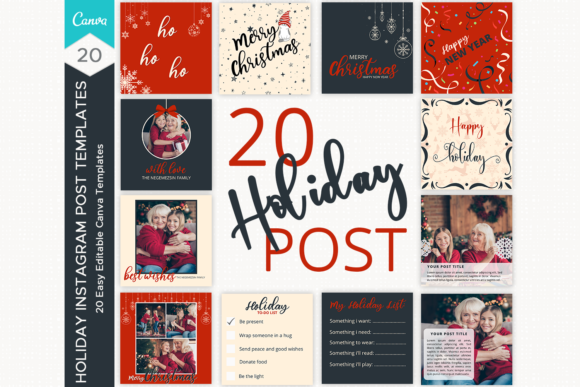
Holiday Instagram Post Templates: How to Choose and Use Them Without the Common Headaches
The holiday season is a critical time for engagement, but creating content from scratch often leads to burnout and inconsistency. Holiday Instagram Post Templates offer a shortcut to professional design, ensuring your feed looks festive and cohesive without the stress of starting from a blank canvas. These pre-designed layouts allow you to plug in your photos and text, making it easy to maintain a consistent posting schedule even when you are busy with seasonal operations.
While the concept sounds simple, many creators and business owners stumble during the selection and execution phases. The market is flooded with options, ranging from complex Photoshop files to simple Canva designs. Understanding the nuances of these templates—specifically regarding file compatibility and customization limits—is the difference between a seamless workflow and a frustrating afternoon. This guide explores the critical details you need to check before purchasing Holiday Instagram Post Templates and offers practical advice on how to maximize their potential.
The Photoshop vs. Canva Misunderstanding
One of the most frequent errors buyers make is assuming all digital design products work the same way. A common source of buyer’s remorse involves purchasing templates that require software the user does not own or know how to operate. For instance, many high-end templates on marketplaces are designed for Adobe Photoshop. If you are a small business owner or a blogger without a subscription to the Creative Cloud, you simply cannot use them effectively.
Avoid this by strictly verifying the file format before checkout. If you see "PSD" or "Adobe Photoshop" in the file details, you are looking at a product that requires advanced software. Conversely, products labeled as Canva Templates are browser-based and require no expensive subscriptions. For example, a listing for Christmas Post Templates might explicitly state: ► DETAILS ◄ - 20 Canva templates easy editable. you don't need photoshop -Photoshop is not required for this product.
This distinction is vital. If you lack advanced technical skills, choosing Canva Templates is the better approach. You avoid the steep learning curve of layer-based editing software. However, be aware that Canva’s capabilities differ from Photoshop. While Canva is excellent for text overlays and photo placement, complex effects like advanced masking or custom 3D rendering are generally not possible. Knowing this limitation helps you set realistic expectations for the final output.
Avoiding the "One-Click" Fallacy
A major misconception regarding Holiday Instagram Post Templates is that they are "magic buttons." Many buyers assume that downloading the file will instantly produce a finished post. In reality, a template is merely a structure. If you simply swap the placeholder text for your own without adjusting the typography or color palette, the result often looks disjointed.
The mistake here is neglecting brand alignment. A template might look beautiful in the preview because the designer used a specific color scheme. If your brand colors clash with the template’s defaults, you must change them. Failure to do so can confuse your audience and dilute your brand identity.
Better Approach: Before you even open the template, have your brand kit ready. This includes your specific hex color codes and preferred font names. When you open the Christmas Post Templates, immediately update the global colors and fonts first. This ensures that every element you edit thereafter aligns with your professional image. Do not treat the design as a rigid painting; treat it as a flexible framework meant to be molded to your specific needs.
Evaluating "Basic Knowledge" Requirements
Listings for templates often include phrases like: A Basic Knowledge of Canva is needed for this listing. super basic knowledge of canva. If you haven't used Canva before, don't worry, because using canva is very simple. While this is generally true, "simple" is subjective.
A common pitfall for absolute beginners is underestimating the time required to learn the platform’s interface. Even with easy editable files, you need to understand how to unlock elements, manage layers (via the position tab), and navigate the "Uploads" section. If you wait until December 23rd to try and edit your Holiday Instagram Post Templates for the first time, you may miss your posting window due to technical frustration.
How to Fix This: Do not wait until the holidays to start. Download your templates at least two weeks in advance. Spend an hour familiarizing yourself with the Canva dashboard. If you encounter a snag, utilize the support offered by the creator. As noted in many quality listings: Moreover, if you need any assistance, you can contact me for support. Reaching out early ensures you aren't scrambling for help during a busy weekend.
Visual Hierarchy and Content Overcrowding
When using Holiday Instagram Post Templates, there is a temptation to use every available text box. If a template has space for a headline, a subheadline, and a caption, some users will fill every inch with text. This overwhelms the viewer and reduces the effectiveness of the post.
Instagram is a visual platform. The image should do the heavy lifting. If you are using Christmas Post Templates to announce a sale, you do not need to list every term and condition on the image itself. Doing so makes the text too small to read on mobile devices, which is how the vast majority of users view content.
Practical Advice: Embrace negative space. If the template allows for a description, but your message is simple (e.g., "50% Off Today Only"), delete the extra text boxes. Keep the design clean. A cluttered post signals a lack of professionalism and can actually lower engagement rates because the user scrolls past without understanding the offer immediately.
Checking for Commercial Licensing and Support
Finally, a detail often overlooked is the licensing agreement. Most digital products for Holiday Instagram Post Templates come with a license, but the terms vary. Some are for personal use only (meaning you cannot use them for a business account), while others require a special extended license for client work.
Furthermore, consider the value of support. A cheap template pack might save you five dollars upfront, but if the links are broken or the fonts are missing, you are left stranded. A slightly more expensive option that explicitly offers support is a safer investment. When a seller guarantees that Photoshop is not required and offers help if you get stuck, they are providing a safety net that justifies the price.
By verifying the software compatibility, preparing your brand assets in advance, and respecting the design's visual hierarchy, you can turn generic Holiday Instagram Post Templates into powerful tools for business growth. They are designed to save you time, but only if you approach them with the right strategy and preparation.