Professional Gift Voucher Design: Streamline Your Creative Process
For small business owners, freelancers, and creative professionals, the ability to offer polished, branded vouchers can significantly enhance customer loyalty and boost sales. However, designing these materials from scratch often requires a substantial investment of time and specialized graphic design skills. Gift Voucher PSD Templates Vol 090 addresses this challenge by providing a structured, high-quality foundation that allows users to produce professional-grade vouchers without starting from a blank canvas. This approach is particularly valuable for those who need to maintain brand consistency across multiple marketing materials while operating under tight deadlines.
Understanding the Practical Value of a Template-Based Approach
The core utility of this product lies in its thoughtful construction. Rather than offering a static, unchangeable design, the Gift Voucher PSD Templates Vol 090 package is built around the concept of adaptability. The files are fully layered, meaning every element—from the background texture to the text containers and graphic borders—exists on its own separate layer in Adobe Photoshop. This granular control is what transforms a simple template into a powerful design tool. A café owner, for example, can easily swap out a placeholder image for a photo of their signature latte, adjust the color scheme to match their interior decor, and rewrite the promotional text to highlight a seasonal offer, all without disrupting the underlying design structure.
One of the most significant technical advantages is the use of Smart Objects for image containers. For those unfamiliar, a Smart Object in Photoshop is a special layer that preserves an image's source content. When you place your photograph into a Smart Object layer, you can scale, rotate, or warp it non-destructively. This means you can experiment with different product shots or hero images for your voucher without permanently altering the original file or losing quality. This feature alone can save hours of frustration, especially when trying to achieve the perfect visual balance.
Key Features That Support Efficiency and Quality
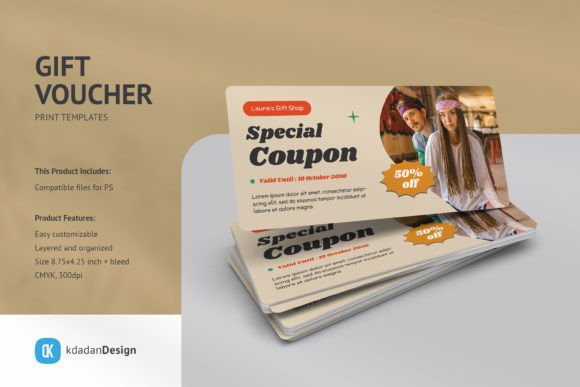
Beyond the basic editable layers, several specific features make this template set a practical choice. The artboard is sized at 8.75x4.25 inches with bleed, which is a standard dimension for many print shops, ensuring your final product will print correctly without unexpected cropping. The files are prepared in CMYK color mode at 300dpi, which is the professional standard for high-resolution printing. This technical preparation means you can send the final file directly to a printer with confidence, avoiding the common pitfall of designing in RGB (which is for screens) and having colors appear dull or incorrect in print.
It is important to note that while the template provides the framework, certain assets require your own input. The free fonts used in the design are not included in the download, but a link to download them is provided. This is a common and reasonable practice in the template market, as it ensures you have the latest version of the font and can install it properly on your system. Similarly, the mockup presentations shown in the product previews are for demonstration only; you are receiving the editable PSD file, not a 3D-rendered scene. This distinction is crucial for setting the right expectations—you are getting the design tool, not the finished marketing image.
Who Benefits Most from This Specific Template?
The ideal user for Gift Voucher PSD Templates Vol 090 is someone with a basic to intermediate understanding of Adobe Photoshop. You don't need to be an expert, but you should be comfortable opening a PSD file, navigating the Layers panel, and using simple tools like the Move Tool and Type Tool. This template is particularly beneficial for:
- Small Business Owners: A boutique hotel, a local spa, or a specialty bookstore can use this template to create elegant vouchers for gift-giving seasons, loyalty rewards, or promotional campaigns. The clean, modern design aesthetic aligns well with businesses that want to project a sophisticated brand image.
- Freelance Designers and Marketers: For professionals who serve multiple clients, having a library of high-quality, customizable templates like this one can dramatically speed up project turnaround. Instead of designing a voucher from the ground up for each client, you can quickly adapt this template to fit different brand guidelines, allowing you to focus more on strategy and less on initial layout.
- Event Planners and Educators: Those organizing workshops, conferences, or courses can create professional-looking vouchers for early-bird discounts, speaker gifts, or participant thank-yous. The ability to easily change text means you can tailor the message for different audiences or events.
The benefit is not just about having a pretty design; it's about reducing decision fatigue. When you open a blank Photoshop document, the possibilities are endless, which can be paralyzing. A well-structured template provides a creative constraint that actually fosters productivity. You are guided by a professional layout, allowing you to focus your creative energy on the content and branding details that matter most.
A Realistic Workflow and Considerations
Imagine a freelance graphic designer hired to create a holiday gift card for a client's online boutique. Using Gift Voucher PSD Templates Vol 090, their process might look like this:
- Initial Setup: Open the PSD file in Photoshop. The first step is to locate the Help Files included in the product. These often contain specific instructions on which layers to edit and how the Smart Objects are organized.
- Customization: Double-click on a Smart Object layer thumbnail to open it as a separate .PSB file. Here, they would place the client's product image, save the .PSB file, and watch it update automatically in the main voucher design. They would then use the Type Tool to replace placeholder text with the client's business name, voucher value, and terms.
- Color and Brand Alignment: Using Photoshop's color adjustment layers or simply changing the fill colors of shape layers, they would adjust the template's color palette to match the client's brand colors.
- Final Review and Export: After reviewing the design for alignment and consistency, they would save a copy for print (likely as a PDF or high-quality JPEG) and a separate copy for digital use (perhaps a PNG with a transparent background).
This workflow highlights the template's role as a time-saving catalyst. However, it's also important to acknowledge its limitations. This is a static design template, not a dynamic software plugin. It does not automatically generate unique codes for each voucher or integrate with e-commerce platforms for redemption. For that level of functionality, you would need dedicated voucher management software. This template is best suited for the design and production phase—creating the physical or digital asset itself.
Furthermore, while the design is modern and clean, its suitability depends on your brand's aesthetic. If your brand identity is highly whimsical, vintage, or ultra-minimalist, you may need to make substantial modifications. The template provides a strong, professional starting point, but it is not a one-size-fits-all solution. It is most effective when its inherent style aligns with, or can be easily adapted to, your visual language.
Integrating This Tool into Your Broader Strategy
Ultimately, Gift Voucher PSD Templates Vol 090 is more than just a downloadable file; it's a component in a more efficient creative workflow. By leveraging a pre-designed, print-ready template, you free up mental and temporal resources that can be redirected toward other critical aspects of your business or project—such as crafting the offer behind the voucher, planning a marketing campaign to promote it, or developing the customer experience that makes the voucher valuable in the first place.
For the entrepreneur, it means being able to launch a gift card program swiftly. For the designer, it means delivering a polished product faster. For the hobbyist or educator, it means achieving a professional result without a steep learning curve. The true value is in the practical outcome: a tangible, high-quality product that supports your goals, whether that's increasing revenue, enhancing brand perception, or simply expressing appreciation in a visually coherent way.
When considering this template, think about your specific needs, your comfort level with Photoshop, and the volume of work you anticipate. If you regularly need to produce similar printed materials, investing in a robust template library like this can be a strategic decision that pays dividends in saved time and elevated quality for years to come.