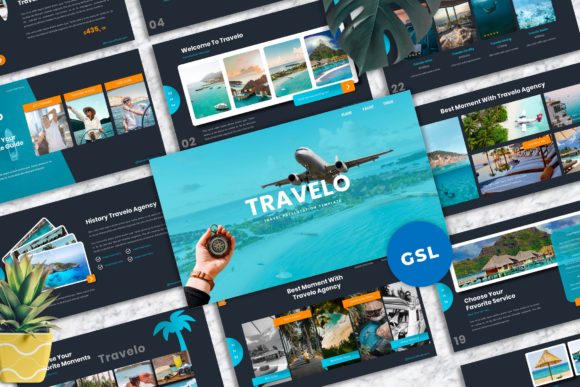
A Detailed Look at Travelo: Evaluating a Versatile Google Slides Template for Modern Presentations
When preparing a presentation, the balance between professional aesthetics and functional efficiency is often difficult to strike. Many professionals find themselves caught between the rigidity of standard corporate templates and the overwhelming complexity of designing a deck from scratch. The Travelo - Travel Googleslide Templates package enters this landscape as a specialized toolkit, promising a blend of visual appeal and structural adaptability. While the name suggests a focus on the tourism sector, a closer examination reveals a design philosophy that prioritizes versatility and user experience.
Defining the Core Offering
At its foundation, Travelo - Travel Googleslide Templates is a collection of 40 master slide layouts designed specifically for the Google Slides environment. It is important to note that this is not merely a static set of images; it is a dynamic framework based on master slides, which allows for centralized editing and consistent styling across the entire presentation. The package relies on a 16:9 widescreen ratio, which is the current standard for most display devices and projectors, ensuring that the content looks proportional regardless of the viewing medium.
The distinctiveness of Travelo lies in its modular approach. Unlike many templates that offer a linear narrative structure, this collection provides a variety of layouts ranging from portfolio displays to corporate agency profiles. This makes it a practical resource not just for travel agencies, but for creative studios, photography portfolios, and general corporate reporting. The inclusion of vector-based icons and unique mockup devices further enhances its utility, allowing users to showcase digital products or concepts without needing external design software.
Comparing Usability and Workflow Efficiency
When evaluating presentation tools, the workflow is often as important as the final output. Traditional presentation design often involves a tedious process of aligning objects, resizing elements, and manually adjusting fonts. Travelo - Travel Googleslide Templates addresses these pain points through several specific features that distinguish it from more basic or overly complex alternatives.
One of the primary differentiators is the "Drag and Drop" functionality combined with picture placeholders. In many older or less sophisticated templates, inserting an image requires cropping and resizing the photo to fit a specific box. Travelo streamlines this by utilizing shape masking, where users can simply drag an image into a designated area, and it automatically conforms to the shape and size of the placeholder. This feature alone can significantly reduce the time spent on formatting, making it a strong contender for users who need to assemble presentations quickly.
Furthermore, the emphasis on easy color change is a critical factor for brand alignment. Many templates use static colors that require manual editing on every single slide, which introduces the risk of inconsistency. Because Travelo is based on Master Slides, changing the primary color palette usually involves editing the master theme, which then propagates the change throughout the entire deck. This structural integrity is vital for corporate users who must adhere to strict brand guidelines.
Visual Quality and Design Flexibility
The aesthetic quality of a presentation directly influences audience engagement. Travelo - Travel Googleslide Templates places a strong focus on typography and usability, two elements that are often at odds in template design. Many visual-heavy templates sacrifice readability for style, using decorative fonts that are difficult to read on screen. Travelo recommends free web fonts, which ensures that the text remains legible while also making the template accessible to users who do not have premium font subscriptions.
Comparing this to other resources, such as standard office suite defaults or basic online generators, the difference in professionalism is evident. The inclusion of high-resolution imagery from sources like Unsplash and Pexels in the preview demonstrates the template's potential. However, users should be aware that these images are for preview purposes only and are not included in the final files. This is a standard practice in the industry, but it requires the user to source their own high-quality photography to maintain the visual impact of the design.
The "Unique Mockup Devices" feature also warrants comparison. In a standard presentation, showing a website or app interface often requires taking screenshots and pasting them awkwardly onto a slide. Travelo includes vector-based device frames where users can insert their content directly. This creates a polished, "agency-level" look that is difficult to achieve with generic tools.
Analyzing Tradeoffs and Limitations
No design resource is without its tradeoffs, and a balanced evaluation requires looking at where Travelo - Travel Googleslide Templates might fall short. While the template is highly versatile for visual storytelling and portfolio showcasing, it may not be the ideal solution for data-heavy presentations. If a user’s primary goal is to present complex charts, graphs, and dense statistical data, a template designed specifically for data visualization might offer more structured layouts for that purpose.
Additionally, while the "Drag and Drop" feature is convenient, it relies on the user having a basic understanding of the Google Slides interface. Users who are accustomed to PowerPoint might find the Google Slides environment slightly different in how it handles layering and object management, though the learning curve is generally gentle.
Another consideration is the reliance on external resources for imagery. As noted, the actual photos are not included. For a user who does not have access to a library of professional photographs, the template might look significantly different once the placeholder images are removed. This highlights the importance of having a media strategy in place before purchasing or utilizing the template.
Determining the Best Fit
So, when is Travelo - Travel Googleslide Templates the right choice? It is particularly well-suited for professionals who need to convey a sense of modernity and creativity. If you are a freelancer presenting a portfolio, a travel agency pitching a new destination package, or a creative studio showcasing a campaign, the visual language of Travelo aligns well with those goals. Its 40 layouts provide enough variety to prevent the presentation from feeling repetitive, even over a longer duration.
Conversely, if you are operating in a highly traditional corporate environment where the audience expects a strictly formal, text-heavy document, the design language of Travelo might feel too "lifestyle" oriented. In such cases, a more conservative template with fewer graphic elements might be more appropriate.
Ultimately, the value of Travelo - Travel Googleslide Templates lies in its attempt to bridge the gap between aesthetic appeal and practical application. By offering resizable graphics, vector icons, and a master-slide-based structure, it provides a robust foundation for creating presentations that are both visually engaging and easy to manage. For users who value design quality and workflow efficiency, it represents a viable option worth comparing against more generic alternatives.