A Practical Look at Magazine Page Canva Templates for Modern Content Creation
In the digital landscape, the demand for high-quality, visually engaging content is constant. For entrepreneurs, coaches, and small business owners, the challenge often lies in producing professional materials without a dedicated design team or a substantial budget. This is where versatile tools like Magazine Page Canva Templates enter the conversation, offering a blend of professionalism and accessibility. But how do you determine if this specific resource aligns with your goals? This analysis explores its core features, ideal applications, and how it stands within the broader ecosystem of digital design resources.
Understanding the Core Offering
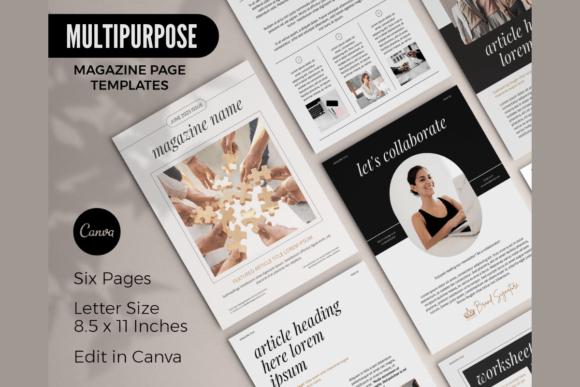
At its heart, a Magazine Page Canva Template is a pre-designed, editable framework for creating multi-page digital or printable documents. The key distinction from a simple social media graphic template is its structure. It provides a cohesive layout system across multiple pages—typically six in this case—designed to present information in a flowing, editorial format. The standard 8.5 x 11-inch page size makes it immediately practical for both digital viewing and physical printing, a significant advantage for creating lead magnets, workbooks, or client handouts.
The true value lies in its integration with Canva, a widely accessible, browser-based design platform. This means the barrier to entry is low; a free Canva account is the only prerequisite for editing. Users are not buying a static PDF but gaining access to a living template they can manipulate. This includes changing text, colors, fonts, and images to match their brand identity. The inclusion of stock photos from Canva's library within the template further simplifies the initial customization process, providing a ready-made visual starting point.
Comparing Approaches: Templates vs. Custom Design
When evaluating a resource like Magazine Page Canva Templates, it's helpful to position it between two extremes: starting from a blank canvas and commissioning fully custom design.
Starting from scratch in Canva or another tool offers maximum creative freedom but demands significant time, skill, and a clear design vision. It is the right path for those with unique branding requirements or the need for a completely novel layout, but it presents a steep learning curve and can lead to inconsistent results without professional oversight.
Hiring a designer guarantees a bespoke, high-end product tailored exactly to your specifications. This is the premium option for established brands with specific aesthetic needs and the budget to support it. The trade-off is cost, timeline, and the ongoing need for professional assistance for future updates.
Magazine Page Canva Templates occupy a practical middle ground. They provide a professional design foundation, eliminating the "blank page paralysis" and ensuring visual consistency. The trade-off is a degree of limitation; while highly customizable, you are working within the boundaries of the original template's structure. For many, this constraint is a benefit, offering guardrails that lead to a polished outcome efficiently.
Identifying the Best-Fit Scenarios
This resource is particularly well-suited for specific use cases where speed, cost-effectiveness, and a professional appearance are paramount.
- Lead Magnets and Digital Downloads: Creating a compelling PDF guide or checklist to grow an email list is a classic application. The multi-page format allows for a structured presentation of valuable content, making it feel more substantial and valuable than a single-page cheat sheet.
- Client-Facing Workbooks and Reports: Coaches, consultants, and educators can use these templates to develop workshop materials, client onboarding guides, or quarterly reports. The ability to mix and match pages allows for the creation of customized documents for different clients or programs without reinventing the wheel each time.
- Internal Newsletters and Proposals: For small businesses needing to communicate with teams or pitch to clients, a well-designed internal newsletter or proposal template can enhance credibility. The magazine style conveys thoughtfulness and professionalism, which can be a subtle differentiator.
- Content Repurposing: A core strength is its versatility. A series of blog posts or podcast notes can be efficiently repurposed and compiled into a cohesive magazine-style PDF, giving existing content a new, more permanent life and format.
Key Strengths
The primary advantage is efficiency. What might take hours of layout design is reduced to minutes of editing and customization. The consistency across pages ensures a unified brand experience. Furthermore, the low cost of entry—both in terms of money and required skill—makes professional design accessible. The fact that it is an instant digital download means you can begin working immediately upon purchase.
Potential Limitations
It is important to recognize the boundaries. The template is not intended for resale without modification. This means you cannot purchase it and sell the unaltered template file to others. Its use is for creating your own end-products. Additionally, while customizable, achieving a radically different look might require more advanced Canva skills or a willingness to significantly alter the provided structure. The design is also inherently tied to Canva's ecosystem; if you prefer desktop software like Adobe InDesign, this resource is not a fit.
Making Your Decision
Consider these factors when deciding if Magazine Page Canva Templates are right for you:
- Your Primary Need: Is it for a one-off project or a recurring content type? The template's value multiplies if you plan to create multiple documents in a similar style.
- Your Brand Maturity: For new businesses or solopreneurs defining their brand, it offers a way to launch professional materials quickly. For brands with a rigid, established style guide, a custom solution might be necessary to achieve exact compliance.
- Your Resource Allocation: If your time is better spent on core business activities than on design, a template is a force multiplier. If you have a dedicated designer on staff, their time might be better spent on higher-value custom work.
Exploring Alternatives and Adjacent Options
The market for design templates is vast. You might encounter options for specific software like Microsoft Word or Adobe Photoshop. Word templates are often simpler but can look less polished and are harder to make visually dynamic. Photoshop templates offer high design fidelity but require more technical skill and a paid subscription. Online platforms like Visme or Adobe Express also offer template libraries, each with their own editor and feature set. The choice often comes down to your existing workflow and comfort level with the tool.
Another alternative is using full magazine layout software, which is more complex and expensive, designed for professional publishers. The Magazine Page Canva Template approach is fundamentally different—it's a design shortcut for content creators, not a publishing system. It focuses on the final, polished output rather than the complex process of typesetting and pre-press.
Conclusion: A Tool for Strategic Efficiency
Ultimately, Magazine Page Canva Templates are less about the template itself and more about the workflow it enables. It is a strategic tool for those who need to produce consistent, professional-looking multi-page content quickly and affordably. It shines in scenarios where the goal is effective communication—whether for marketing, education, or client service—rather than groundbreaking artistic design. By understanding its intended use as a customizable starting point, you can leverage it to elevate your brand's materials without the overhead of starting from zero or the expense of full custom work. Evaluate your specific project needs, resources, and desired level of uniqueness to determine if this versatile resource is the right fit for your next content creation endeavor.