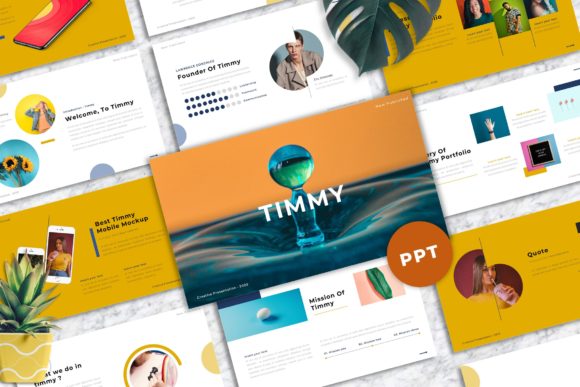
Designing with Impact: A Deep Dive into Timmy - Creative Powerpoint Templates
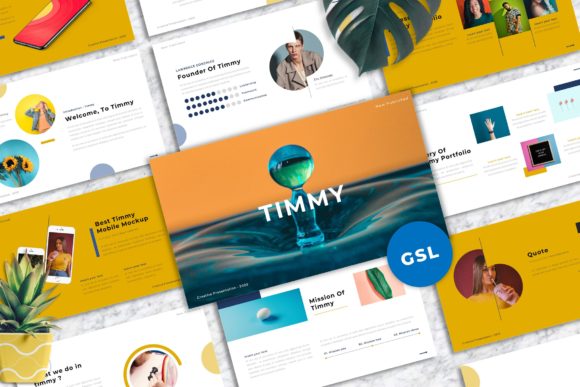
In the digital age, a presentation is often the first significant impression you make on an audience. Whether you are pitching a new idea to investors, showcasing a portfolio to potential clients, or presenting quarterly results to your team, the visual medium is just as critical as the spoken word. A cluttered, outdated, or generic slide deck can undermine even the most compelling narrative. This is where the right design tool becomes a game-changer. Enter Timmy - Creative Powerpoint Templates, a comprehensive solution designed to bridge the gap between professional design and functional usability.
Why Visual Consistency Matters
Before diving into the specific features of this template, it is worth understanding the psychology behind visual consistency. When a viewer sees a cohesive design—consistent fonts, color schemes, and imagery—they subconsciously associate that with reliability and competence. Timmy - Creative Powerpoint Templates addresses this by offering a foundation built on master slides. This ensures that every page of your presentation maintains a unified look, which is essential for building trust with your audience.
The template is engineered with a strong focus on typography and usability. In the world of design, typography is not just about choosing a pretty font; it is about hierarchy and readability. By utilizing recommended free web fonts, the template ensures that your text is accessible and legible across various screens, from high-resolution projectors to smaller laptop displays.
A Toolkit for Every Industry
One of the standout qualities of Timmy - Creative Powerpoint Templates is its sheer versatility. It is not pigeonholed into a single niche. Instead, it serves as a canvas for a wide array of industries and purposes.
- Creative Studios and Agencies: For those in the creative field, the visual standard is naturally higher. The template’s unique mockup devices allow agencies to showcase their digital work—such as website designs or app interfaces—within a realistic context. Instead of just showing a flat screenshot, you can present a design on a device, adding depth and professionalism to your pitch.
- Corporate and Company Use: In a corporate environment, clarity is king. The 16:9 wide-screen ratio is the modern standard, filling the screen without black bars and maximizing the use of space. Whether it is a financial report or a company overview, the layout provides ample room for data visualization and key metrics.
- Personal Portfolios and Photography: Visual storytellers, such as photographers and architects, often struggle with templates that crop their images awkwardly. The drag-and-drop image placeholder feature in Timmy - Creative Powerpoint Templates solves this, allowing users to insert high-resolution photography without losing the composition of the shot.
Technical Features That Streamline Workflow
Time is a resource that professionals rarely have in abundance. A common frustration with many design assets is the complexity of editing them. You might find a beautiful template only to discover that changing a single color requires hours of manual work. Timmy - Creative Powerpoint Templates is designed to mitigate this friction.
The architecture is based on vector-based icons and resizable graphics. This is a crucial technical detail. Unlike raster images, which become pixelated and blurry when enlarged, vector graphics can be scaled to any size—whether on a 4K monitor or a printed poster—without losing quality. This ensures that your presentation remains sharp and professional, regardless of the output size.
Furthermore, the ease of color change is a significant workflow enhancer. If you are preparing a presentation for a specific client with strict brand guidelines, you need to be able to adapt the palette quickly. With this template, you can modify the color scheme globally, ensuring that every element aligns with the brand identity in just a few clicks.
Exploring the 40 Master Slide Layouts
Content variety is the spice of a good presentation. Repeating the same slide layout can bore an audience. Timmy - Creative Powerpoint Templates includes 40 distinct master slide layouts. This extensive library means you have a specific structure for almost any type of information you need to convey.
You will find layouts tailored for:
- Introductions and Team Overviews: Slides designed to humanize your presentation, perfect for introducing speakers or key personnel.
- Data and Statistics: Clean, organized layouts for charts, graphs, and infographics that make complex data digestible.
- Image-Heavy Showcases: Full-bleed image slides that allow your visuals to take center stage, ideal for portfolio reviews.
- Call to Action and Contact: Strong closing slides designed to prompt the next step, whether that is a follow-up meeting or a website visit.
By having these layouts pre-designed, you spend less time arranging boxes on a slide and more time refining your message.
Practical Considerations and Support
When adopting a new digital tool, the post-purchase experience is just as important as the product itself. It is common to encounter technical hurdles or have questions about specific features. Recognizing this, the creators of Timmy - Creative Powerpoint Templates offer free support and a documentation file.
The documentation file is particularly valuable as it includes information on the fonts used. One of the most common issues when transferring PowerPoint files between computers is missing fonts, which can break your layout. By guiding you to the correct free web fonts, the template ensures that your presentation looks exactly as intended, even if you are presenting on a computer that does not have custom fonts installed.
Additionally, the inclusion of a .PPTX file ensures compatibility with the industry-standard software. While there are many presentation tools available today, PowerPoint remains the most widely used in professional settings. This compatibility ensures that you can share your file with clients or colleagues without worrying about software conflicts.
The Role of Imagery and Assets
A template is only as good as the content you put into it. However, having high-quality assets to start with makes the process much smoother. Timmy - Creative Powerpoint Templates is noted for being "made very carefully with attention to detail." This design philosophy extends to the inclusion of unique mockup devices.
For a web developer or a UI designer, these mockups are invaluable. Instead of spending time searching for a suitable device frame and trying to mask your screenshot into it, the template provides these elements ready to use. This allows for a more polished presentation of digital products, giving the audience a tangible sense of how the final product will look and feel.
It is important to note that while the demo images (sourced from platforms like Unsplash and Pexels) are for preview purposes, they serve as excellent placeholders. They demonstrate the potential of the layout and help you visualize where your own content should go. This guidance helps prevent the "blank page syndrome" where users are unsure how to populate a layout effectively.
Who Stands to Benefit Most?
While the template is designed for broad use, certain professionals may find it particularly transformative.
Freelancers and Consultants: Often, freelancers wear many hats, including that of the designer. If design is not your primary skill, a template like Timmy - Creative Powerpoint Templates acts as a safety net. It ensures that your deliverables look professional, which can be the deciding factor in winning a contract.
Marketing Teams: Marketing campaigns often require rapid iteration. Whether it is a pitch for a new campaign strategy or a debrief on recent performance, the ability to quickly assemble a visually appealing deck is essential. The drag-and-drop functionality allows marketing teams to swap out images and text rapidly to keep up with the fast pace of the industry.
Students and Educators: In an academic setting, clarity and engagement are vital. Students presenting theses or educators creating course materials can utilize the clean layouts to organize their information logically, making the learning process more effective.
Maximizing the Potential of Your Deck
To get the most out of Timmy - Creative Powerpoint Templates, consider a few best practices. First, embrace the white space. The layouts are designed with breathing room in mind; do not feel the urge to fill every inch with text. Second, utilize the vector icons to break up text-heavy slides. Visual cues help the audience process information faster. Finally, stick to the master slides. While it might be tempting to manually adjust elements, using the pre-set structures ensures that your alignment and spacing remain consistent throughout the document.
Ultimately, a presentation is a story. Timmy - Creative Powerpoint Templates provides the stage, the lighting, and the props. It handles the technical and aesthetic heavy lifting so that you can focus on delivering a narrative that resonates. By combining professional design with user-friendly features, it empowers users across industries to present their ideas with confidence and style.